


How to use the keyboard
A keyboard is displayed on the LCD monitor when text needs to be entered.
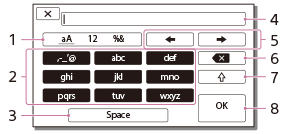
-
Switch character types.
Each time you switch character types, character types are switched among alphabet letters, numerals and symbols.
-
Keyboard
Each time you select and enter any character, the character that you enter will be displayed in turn.
For example: If you want to enter âabdâ
Select [abc] and press it once to display âa,â and then enter âaâ with
 . To enter âbâ and âd,â press [abc] twice to display âb,â and then press [def] once to display âd.â
 -
Space
Enters a space.
-
Input box
The characters you entered are displayed.
 indicates the limit to text length.
 -
Move cursor
Moves the cursor in the input box to the right or left.
-
Delete
Deletes the character preceding the cursor.
-

Switches the next character to a capital or small letter.
-
Fix
Finalizes the entry.
To cancel text entry, select  .
.